For retirement payments administered by OPM, get the statement through OPM Retirement Services Online. Sign in, choose Verification of Annuity, select the payment period, and use the save or print control. OPM now uses that name for its monthly annuity payment statement. It is distinct from an old employer pay stub, a bank transaction, and the annual Form 1099-R.
For recipients of OPM-administered retirement payments · Sources checked October 29, 2026 · This guide covers document access and reading, not a benefit entitlement or tax calculation.
OPM’s May 2026 service update confirms the change to the Verification of Annuity name. Searching for “retired federal employee pay stubs” can lead to records from several different systems. First identify the payer and the document requested. A statement about an OPM annuity belongs in the retirement account, while a pre-retirement salary statement belongs with the former employer’s payroll records.
Which retirement or payroll document do you need?
| Requested information | Record to identify | Starting point |
|---|---|---|
| OPM annuity payment detail | Verification of Annuity or annuity payment statement | OPM Retirement Services Online |
| Annual annuity tax reporting | Relevant year’s Form 1099-R | OPM’s tax-form instructions |
| Salary before retirement | Former employer’s earnings statement | Former payroll or personnel office |
| Credit to a bank account | Bank statement or transaction record | The financial institution |
OPM’s Services Online overview lists annuity statements and duplicate Form 1099-R among its services. The records have different purposes even when their amounts relate to the same retirement income.
Ask a reviewer whether it needs current annuity verification, a statement for particular payment dates, annual tax information, or proof of an account credit. Do not assume one document satisfies every request.
How do you view, download, or print the statement?
Follow OPM’s current statement instructions:
- Open the official portal. Begin at OPM Retirement Services Online.
- Sign in to your retirement account. Complete the sign-in and any required account-linking instructions.
- Choose Verification of Annuity. OPM identifies this as the current menu entry for the statement.
- Select the payment period. Choose the period you need from the dropdown.
- Save or print. Use the document’s save or print icon.
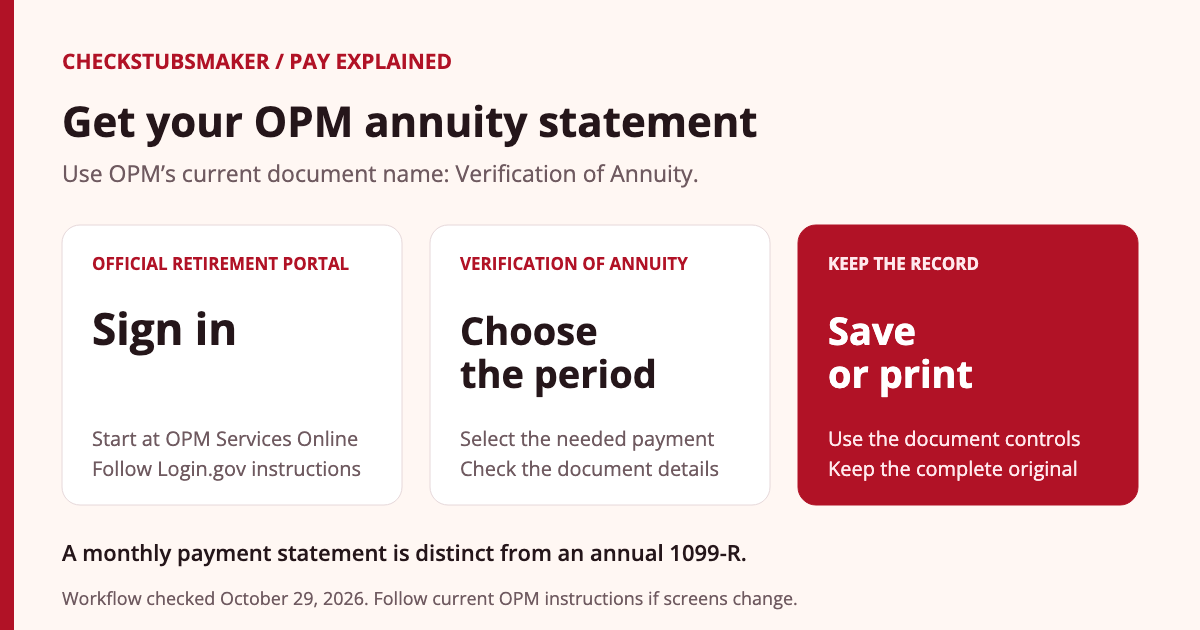
Before submitting the file, check the name, payer, selected period, completeness, and legibility. Keep the downloaded original and give it a filename identifying the payment period.
What if you cannot sign in?
The current portal uses Login.gov and explains account linking for first access or an inactivity lockout. It also instructs people who used the Online Retirement Application to use the same Login.gov account and email address they used there.
Login.gov’s OPM help page says to start directly on Retirement Services Online. It distinguishes sign-in assistance from OPM account activation, annuity verification, benefits, and tax questions.
Identify the stage that failed: Login.gov credentials or authentication, linking to the retirement account, or access to a particular statement. Use the corresponding official help channel. Login.gov does not hold the retirement benefit information.
Keep passwords, authentication codes, and full claim identifiers out of an ordinary document request to a lender or another reviewer. If OPM requests identity details, provide them through the official process rather than in a public comment.
What information does the annuity statement explain?
OPM’s annuity-statement FAQ describes gross payment, deductions or additions, and net payment. It also explains that effective timing and the monthly processing cutoff can affect when a change appears.
Read each listed adjustment and deduction for the selected period. Compare a changed amount with the previous statement and any related notice, rather than treating every difference as an error.
Gross annuity, net payment, and taxable income are different concepts. A statement’s deductions explain a payment; they do not, by themselves, determine the taxable portion of an annuity. Use OPM’s annuitant tax information and the appropriate tax documents for that question.
How can you check a statement against a bank credit?
Assume a fictional monthly statement shows $2,800 gross annuity, $220 tax withholding, $200 health coverage deduction, and $20 life coverage deduction. There are no additions, other deductions, allotments, or adjustments, and the full net amount goes to one account.
| Entry | Assumption | Amount |
|---|---|---|
| Gross annuity | Fictional starting payment | $2,800.00 |
| Tax withholding | Illustrative amount only | −$220.00 |
| Health coverage | Assumed statement deduction | −$200.00 |
| Life coverage | Assumed statement deduction | −$20.00 |
| Net payment | $2,800 − $220 − $200 − $20 | $2,360.00 |
In this example, compare the account credit with $2,360. Do not compare it with $2,800 or subtract the deductions again from the bank credit. The values are invented and do not represent OPM premium rates or an employee’s tax withholding calculation.
For a real mismatch, check the payment date, destination, and actual adjustments, then contact OPM or the bank about its part of the record. Our payroll and bank-record comparison explains the general reconciliation approach.
How do you get an older or mailed statement?
Check which payment periods the account offers. If the required period is unavailable, ask OPM Retirement Services for that specific record. OPM’s statement instructions also provide a contact route for requesting a mailed statement. Do not assume every historical period is available online.
For a Form 1099-R, follow the separate tax-form process. OPM’s tax-information page describes online copies and delivery preferences; verify the selected year and preference instead of assuming a form will arrive by mail.
If you actually need salary stubs from before retirement, identify the former payroll provider and employment dates. Our previous-employer retrieval guide can help organize the request. An OPM annuity statement does not reconstruct the old salary calculation.
What should you include in a request or document packet?
List the document name, needed payment periods or tax year, and requested delivery format. Tell OPM whether the problem is unavailable access, a missing historical period, or an amount on the statement.
A focused request could read: “I need my Verification of Annuity for [payment period]. I can [or cannot] sign in, but [describe the missing document or issue]. Please explain the official way to obtain it.” Provide required identifying information only within OPM’s authorized process.
For a reviewer, confirm acceptance and any permitted redaction. Save the original, the submitted copy, and the request together. See our record-retention guide for organizing employment records; retirement and tax records may have different retention needs.
Frequently asked questions
What is OPM’s annuity statement called now?
OPM’s current instructions call it Verification of Annuity, also described as the monthly annuity payment statement.
Is the statement the same as Form 1099-R?
No. Identify whether the request concerns payment detail or annual tax reporting and obtain the appropriate document.
Can Login.gov correct my annuity amount?
Login.gov handles sign-in help. Contact OPM about benefit information and annuity verification.
Can I request a mailed statement?
OPM’s statement instructions direct users to contact it for a mailed copy.
Does this guide apply to every retirement payment?
No. It covers statements administered by OPM. For another payer, use that payer’s official document service.
Prepared by the CheckStubsMaker Editorial Team using OPM and Login.gov instructions reviewed on the date shown above, plus an original arithmetic illustration. See our editorial policy. Account screens and document availability can change; the official service provides the current instructions.