To find hours on a pay stub, start with the current-period earnings section and read each hours or units label. Separate regular work, overtime, and paid leave. Check whether an overtime row lists additional hours or only an extra premium on hours already counted. Compare the statement with the underlying time record for the same dates; a YTD total or leave balance answers a different question.
For U.S. employees · Sources checked October 29, 2026 · Examples are fictional. Federal overtime discussion concerns covered, nonexempt employees; state rules, agreements, and special employment rules may differ.
A statement can show 84 paid hours without saying the employee worked 84 hours. It can also show one work period across several earnings rows. The reliable approach is to identify what each row measures before adding numbers.
Where are hours shown on a pay stub?
Look for an earnings table with columns such as description, hours, units, rate, current amount, and YTD amount. Confirm the pay-period dates before reviewing the rows. The payment date may fall after the work period.
Use current-period fields for a particular paycheck. A YTD hours column, if provided, is a running total. A leave panel may show accrued or available hours, which are not automatically hours used in the current payment.
For example, a vacation balance of 24 hours and a current vacation earnings row of 4 hours describe different things. The first is a balance; the second identifies paid leave included in this calculation. Our PTO guide explains that distinction.
Which hours or units should you add together?
| Possible row | Reading question | Common source of confusion |
|---|---|---|
| Regular earnings | Does this row cover straight-time work hours? | Other rows may cover the remaining work |
| Overtime | Is this full overtime pay or a premium-only entry? | The same work hours might already appear elsewhere |
| Vacation, holiday, or sick pay | How much leave was paid in this period? | Paid leave is distinct from actual work time |
| Shift premium | Are these already-paid hours receiving an extra amount? | Adding them again may duplicate work time |
| Salary or other units | Are these actual hours, standard units, or another payroll measure? | A displayed number may need payroll’s explanation |
These are reading prompts, not universal code definitions. Ask payroll for its code legend and the meaning of the particular hours column. A code can have a different purpose in another system.
Also separate dollar amounts from units. A $75 adjustment without an hours value cannot be converted into hours until you know what it represents.
Does 7.75 mean 7 hours and 75 minutes?
No. If the system uses decimal hours, the fractional part is a fraction of 60 minutes. 0.75 × 60 = 45 minutes, so 7.75 hours means 7 hours 45 minutes.
Likewise, 7 hours 30 minutes is 7.50 decimal hours. An hours-and-minutes display of 7:30 is a different notation from 7.30 decimal hours, which equals 7 hours 18 minutes.
Confirm the display convention before comparing a time-clock export with a payroll total. Convert both records to the same units and retain their original values. Do not silently round away a difference.
How can paid hours differ from hours actually worked?
Consider a fictional employee paid $22 per hour over two complete employer workweeks. Week one contains 36 hours worked and 4 hours of paid vacation. Week two contains 44 hours worked and no leave.
Assume the employee is covered and nonexempt, the $22 base rate is the applicable regular rate, overtime is due after 40 worked hours in a workweek, and no other rule or compensation changes the calculation. The payroll layout lists overtime hours separately at the full $33 rate.
| Earnings row | Hours and rate | Gross amount |
|---|---|---|
| Regular work | 36 + 40 = 76 hours × $22 | $1,672.00 |
| Overtime work | 4 hours × $33 | $132.00 |
| Paid vacation | 4 hours × $22 | $88.00 |
| Total gross earnings | 76 + 4 + 4 = 84 paid hours | $1,892.00 |
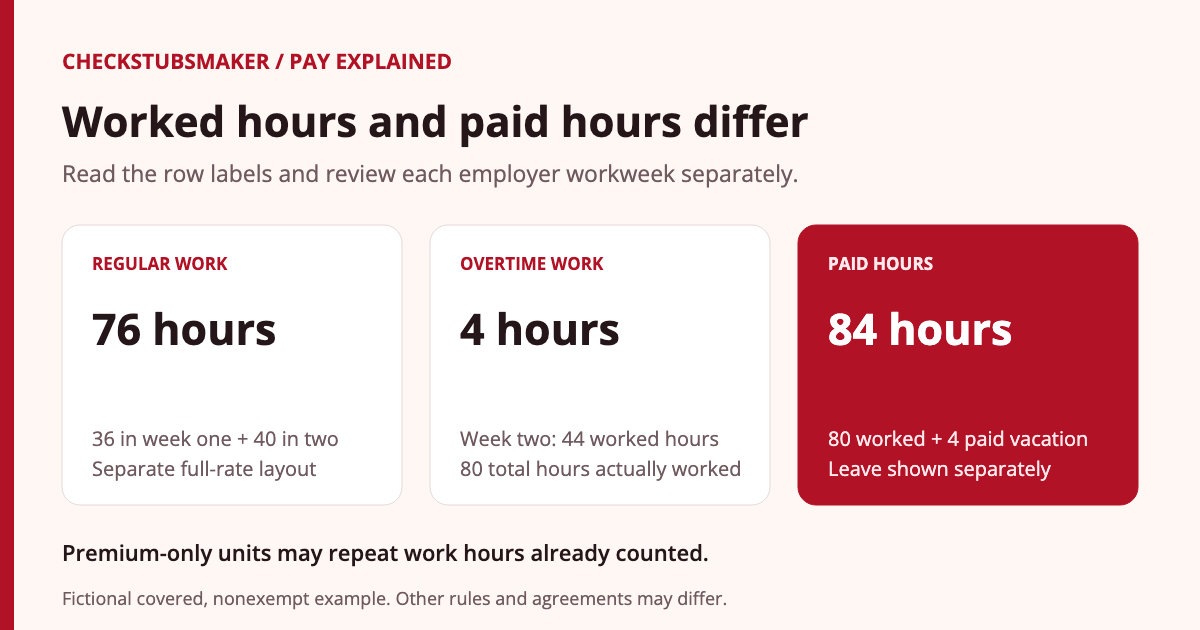
The employee worked 36 + 44 = 80 hours. Four vacation hours bring the paid-hours total to 84. The four overtime hours come from the second workweek’s 44 hours, not from averaging the two weeks.
The U.S. Department of Labor’s overtime overview explains the federal workweek basis and prohibition on averaging multiple weeks. Its hours-worked advisor explains that paid time off for holidays, vacation, or sickness need not count as hours worked for federal overtime purposes. Other applicable requirements or an agreement may provide more.
Can an overtime row duplicate hours already listed?
Yes, depending on the layout. In the example above, overtime is a separate full-rate row. Another layout could show straight-time pay for all 80 worked hours and an additional half-time premium for the four overtime hours.
Under the same simplified assumptions, that alternative is 80 × $22 = $1,760, plus 4 × $11 = $44, plus $88 vacation pay. The result is still $1,892 gross. The four premium units would not be four additional hours worked.
Ask whether a row is full overtime pay, straight time, or a supplemental premium before summing units. For more payroll examples, see overtime on a pay stub.
What records help you check the hours?
DOL Fact Sheet 21 lists daily and weekly work hours among records employers maintain for covered, nonexempt employees. The payroll statement and the underlying time record serve different purposes.
Compare the daily entries, approved leave, employer workweek boundaries, earnings codes, and period covered. Note any later adjustment separately instead of assuming it belongs to the latest week.
Also compare actual work with the schedule. DOL Fact Sheet 22 explains that compensable time may extend beyond a scheduled shift, including work the employer permits. Questions about breaks, travel, or required activities need the relevant facts and rules.
What if hours are missing, blank, or incorrect?
Ask payroll what the field represents and request the underlying calculation for the dates in question. A salary row or blank units field alone does not settle overtime eligibility or prove that the time record is accurate.
The DOL’s pay-stub FAQ distinguishes federal recordkeeping obligations from the FLSA’s lack of a pay-stub delivery requirement. State wage-statement requirements may apply; do not infer a nationwide formatting rule.
A useful request is: “Please reconcile my statement for [dates] with the time record, including regular hours, overtime hours, premium-only units, and paid leave. I calculate a difference of [hours] on [dates].” Keep the response and request an official correction if needed.
Frequently asked questions
Should I add every number in the hours column?
First identify what each row measures. Premium-only entries can repeat hours already counted.
Are paid vacation hours the same as work hours?
No. Separate paid leave from actual work and check the applicable overtime rules and agreement.
What does 0.25 hour mean?
In decimal hours, 0.25 × 60 equals 15 minutes.
Does a salary row showing 80 hours establish my actual work time?
Ask what those units represent and compare the underlying time record. The display alone does not establish classification or entitlement.
Can a two-week total determine federal overtime by itself?
For the ordinary workweek rule discussed here, review each workweek separately rather than averaging the two.
Prepared by the CheckStubsMaker Editorial Team using the DOL sources linked above and original arithmetic examples. See our editorial policy. Actual pay obligations depend on coverage, applicable rules, agreements, and the complete work record.