A pay period is the span of time covered by an earnings calculation. A pay date is the date assigned to the wage payment. They do not have to end on the same day. Match the period’s beginning and ending dates to your work records, then use the pay date to identify the payment. A processing cutoff, bank posting date, or correction for earlier work can add other dates to the picture.
For U.S. employees · Sources checked October 20, 2026 · All schedules, hours, and earnings below are fictional examples.
A statement can show a two-week period ending on Sunday and a payment issued the following Friday. That gap does not, by itself, identify missing wages. The useful question is which work and earnings the payment actually covers—and whether payment meets the applicable payday requirements.
What is the difference between a pay period and a pay date?
The period identifies the earnings window; the payment date identifies a particular payday. Paylocity’s pay-period glossary distinguishes the span used to calculate earnings from the schedule that determines when employees are paid. Look for labels such as “period beginning,” “period ending,” “check date,” or “pay date.” Formats vary by employer.
| Field | What it identifies | What to compare |
|---|---|---|
| Period beginning and ending | The span associated with the statement’s earnings | Time records, leave entries, and the payroll calendar |
| Pay date or check date | The date assigned to the wage payment | The designated payday and payment record |
| Payroll cutoff | A deadline for submitting or processing payroll information | Timecard instructions and payroll notices |
| Bank posting date | When a credit appears in the bank’s records | The actual transaction and available balance |
| Adjustment work dates | Earlier work connected with a correction | The original statement and adjustment breakdown |
Do not assume a portal’s selected date range is the period printed on a statement. Open the actual statement and read its labels. A list may be filtered by payment date while each document describes an earlier earnings period.
Save the payroll calendar together with the statement. Our biweekly versus semimonthly guide explains why a two-week period and a twice-monthly schedule can produce different date patterns.
How does a pay period ending before payday work?
ADP’s explanation of payment in arrears describes paying for labor after the period in which it was performed. This gives payroll time to work with completed attendance and earnings information. Whether an actual payment is timely still depends on the designated payday and applicable law.
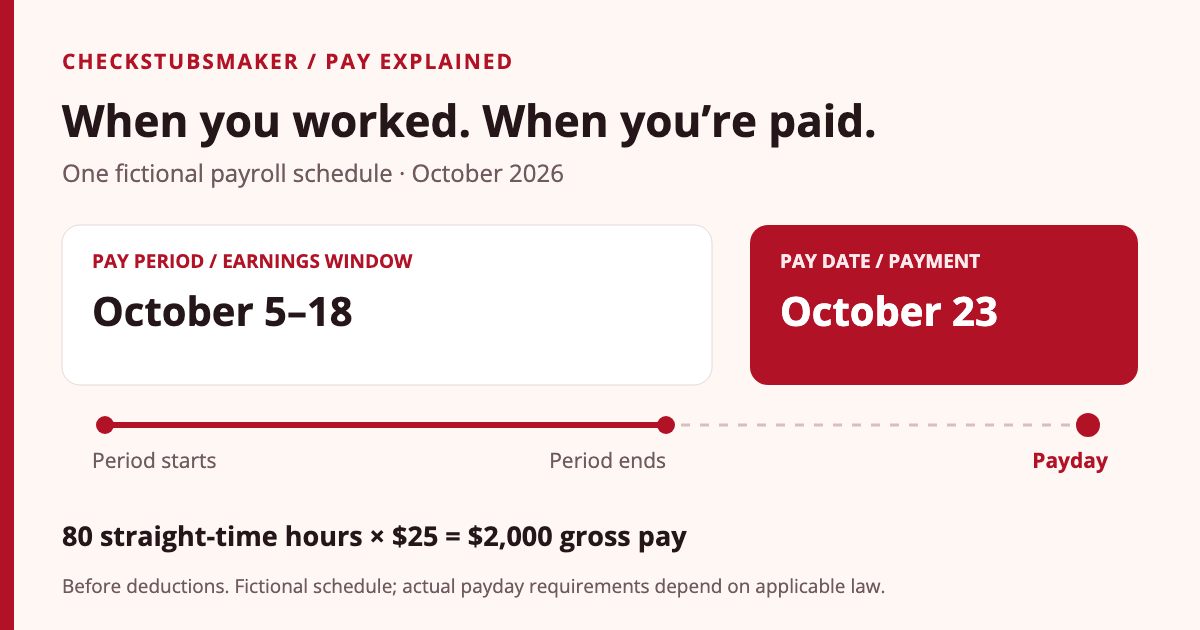
Consider a fictional employer with a two-week earnings period from October 5 through October 18, 2026, and a pay date of October 23. Assume an hourly employee worked 40 hours in each of the employer’s two Monday-through-Sunday workweeks, at $25 per hour, with no overtime, leave, premiums, bonuses, or other earnings.
| Item | Dates or calculation | Result |
|---|---|---|
| First workweek | October 5–11 | 40 worked hours |
| Second workweek | October 12–18 | 40 worked hours |
| Gross earnings | 80 × $25 | $2,000 |
| Pay date | October 23 | Payment for the stated period |
The $2,000 is gross pay before employee taxes and applicable deductions. It does not include work performed October 19–23 merely because the payday is October 23. Under the assumed schedule, those later work dates belong to the next regular earnings period.
To check the next payment, continue the calendar: the following period would run October 19–November 1, with a fictional scheduled payday of November 6. Confirm the employer’s actual calendar rather than treating this five-day gap as a general rule.
Why might a pay date come before the pay period ends?
Some employers pay on a current basis. ADP describes current payroll as payment during a cycle or when it ends, sometimes using estimates that require later adjustment. Check whether your employer pays current salary, completed hourly work, or different earnings components on different schedules.
For example, a monthly salary statement might cover a full calendar month while the designated payday occurs shortly before the month ends. Ask payroll what the payment includes and how changes after the processing cutoff are handled. The date pattern alone does not tell you that the statement is wrong.
A bank credit appearing before the statement’s pay date is a separate observation. Compare the bank transaction with the payroll record before assuming the employer changed the pay period. Our direct-deposit guide explains how to match a payment with its statement.
Do not use a current-pay explanation to dismiss missing hours. If actual work, leave, or rate changes differ from the assumptions used, request a reconciliation and the relevant payment date. A processing practice does not replace applicable wage-payment requirements.
Is a two-week pay period also the overtime workweek?
Under the ordinary federal weekly overtime rule, each workweek stands alone. 29 CFR 778.104 prohibits averaging hours across two or more workweeks for that calculation.
Suppose a different fictional employee covered by this rule works 46 hours in one workweek and 34 in the next. The two-week total is 80, but averaging it into two 40-hour weeks would miss the first week’s six overtime hours. A payment covering both weeks must still reflect the correct underlying calculation.
This example assumes the ordinary rule applies, with no special work-period arrangement. State law or an agreement may provide additional pay rights. Match the employer’s defined workweeks to the time records, then review the earnings lines using our overtime guide.
Which year includes December work paid in January?
The IRS instructions for Forms W-2 and W-3 say W-2 entries use wages paid during the calendar year. A work-period end date in December does not automatically put a January wage payment on the previous year’s W-2.
For a fictional example, assume ordinary cash wages cover December 21, 2026, through January 3, 2027, and are first paid and made available on January 8, 2027. That payment belongs in 2027 wage reporting under this calendar-year principle. Do not split it between years simply by counting the December and January workdays.
Check the actual payment facts if a check, reversal, reissue, or early availability complicates the timing. Also compare the same wage category: gross earnings and W-2 taxable wages can differ. Our YTD guide explains current and cumulative totals; our W-4 versus W-2 guide explains the annual wage statement.
What should you do if the pay stub shows the wrong period?
Check both the dates and the money. A correct bank deposit does not establish that every statement field is accurate. Conversely, an unfamiliar period does not establish an underpayment until you identify which work the payment covers.
- Open the exact statement. Note its payment identifier, pay date, period start, and period end.
- Compare the payroll calendar. Check whether it is the schedule assigned to your employee group and whether a change was announced.
- Match time and earnings. List worked hours, leave, rates, and overtime by the relevant workweeks.
- Separate earlier corrections. Identify any retroactive earnings or separate payments tied to previous dates.
- Reconcile gross and net. Check earnings first, then employee deductions and the payment destination.
- Request an explanation or correction. Ask which work dates were paid, whether the displayed period is incorrect, and what payroll will issue to document the result.
A focused message could say: “The statement dated [pay date] shows [printed period], but the payroll calendar shows [expected period]. Please confirm the work dates, hours, and earnings included, and provide a corrected statement or written explanation if needed.”
Keep the original document, your time records, and payroll’s response. If payroll issues a replacement, retain both versions with a clear note about which one supersedes the other. Avoid editing an employer-issued statement yourself: an altered PDF would no longer be the original record.
If the issue is a short deposit rather than an incorrect heading, compare gross and net pay and check for split deposits or a separate payment. If earlier documents are missing, see how to request older pay stubs.
Must a pay stub show the payment period?
The DOL’s recordkeeping fact sheet lists the date of payment and covered pay period among required employer records for covered nonexempt workers. Those recordkeeping duties should be distinguished from the employee statement itself: the FLSA does not itself require employers to provide pay stubs.
State requirements can add specific statement obligations. As one state-specific example, California’s labor agency lists the inclusive dates of the period paid among required itemized-statement information. Its guidance also addresses payday rules. Check the law applying to your employment rather than assuming one state’s requirements apply everywhere.
When a discrepancy remains unresolved, contact the relevant state labor agency about statement and payday requirements, or the DOL Wage and Hour Division about federal wage issues. Keep the dates and supporting records available.
Frequently asked questions
Is the period-ending date my payday?
Not necessarily. Read the separate pay-date field and the employer’s calendar. The period can end before the scheduled payment is issued.
Does a later payday mean my first week was withheld?
It may reflect payment for a completed period. Trace the first work dates through the schedule and confirm they appear in the proper payment. Do not assume an unexplained missing week is normal.
Do calendar days in a period equal paid hours?
No. A fourteen-day window does not establish eighty paid hours. Use actual work records, the compensation arrangement, and applicable leave entries.
Can one payment include work from more than one period?
Yes, for example when current earnings and an earlier correction are paid together. Ask for the breakdown so the same hours or wages are not counted twice.
Should I change the dates before submitting a stub as proof of income?
Request an employer-issued correction or explanation. Keep the original and ask the recipient which supporting records it accepts; do not silently change payroll dates.
Prepared by the CheckStubsMaker Editorial Team using the primary sources linked above and original fictional examples. See our editorial policy for sourcing and correction standards. Actual schedules and payment obligations depend on the employment arrangement and applicable law.