A military Leave and Earnings Statement, or LES, is the detailed pay record commonly compared with a civilian pay stub. Review the covered period, entitlements, deductions, allotments, payment summary, leave, and remarks. Match bank credits to the relevant payment amount rather than assuming total entitlements equal one deposit. In some LES layouts, mid-month pay appears among deductions because it has already been paid.
For U.S. service members · Sources checked November 2, 2026 · The fictional example uses an active-duty-style monthly summary. Branch, component, pay system, and individual adjustments can change the layout and calculation.
An LES can describe a full month while your bank records show more than one payment. Reading only the largest number can therefore make a correct statement seem inconsistent. Start with the statement’s period and follow its summary.
Where do you get a military LES?
DFAS’s myPay statement FAQ explains how to view, save, and print an LES by selecting the statement option in myPay. Begin at the official myPay service and follow the access instructions applicable to your account.
Choose the record for the required month or payment period. Keep the downloaded original and check whether you have a full statement or a payment-only view.
Military OneSource’s LES guide identifies myPay and the Coast Guard’s Pay & Personnel Center as access routes. Use the system that actually administers your pay rather than assuming all services use an identical screen.
What do the main LES sections mean?
Military OneSource describes the LES as a report of earnings, deductions, and leave, with information about allowances, allotments, taxes, insurance, and retirement contributions. Use the labels on your actual record to organize the review.
| Section | What to identify | Question to ask |
|---|---|---|
| Period and identification | Member, service, and dates covered | Is this the correct record? |
| Entitlements | Pay and allowance entries | Which amounts apply to this period? |
| Deductions | Taxes, other deductions, and any prior payment entry | What does each entry represent? |
| Allotments | Amounts directed to designated recipients or accounts | Where was that portion distributed? |
| Summary | Totals, forwarded amounts, and payment fields | How does the calculation reach the amount payable? |
| Leave and remarks | Balances, notices, and transaction explanations | Does a change need supporting information? |
Do not infer taxability from an entitlement’s placement alone. A military pay or allowance question needs the rules and facts for that particular payment.
How do NET AMT and EOM PAY relate?
The DFAS Navy LES reading guide explains a summary containing amounts brought forward, total entitlements, deductions, allotments, net amount, credit carried forward, and end-of-month pay.
For that layout, NET AMT accounts for prior unpaid amounts plus current entitlements, less deductions and allotments. EOM PAY reflects the resulting end-of-month payment after any credit carried forward. Read the complete summary instead of treating those fields as interchangeable in every case.
Our gross-versus-net guide explains the general distinction between earnings and the amount paid. On an LES, extra summary fields can require an additional reconciliation.
How can you reconcile a month with two payments?
Assume a fictional monthly LES shows $4,800 total entitlements. Taxes and other deductions, excluding mid-month pay, total $800. A $1,600 mid-month payment has already reached the member’s primary account and is included in deductions on this illustrative layout.
Assume allotments total $200, with no amount brought forward, no credit carried forward, and no other adjustments. The $800 is an assumed total, not a tax calculation or a schedule of military benefit rates.
| Entry | Meaning in this example | Amount |
|---|---|---|
| Total entitlements | Starting monthly amount | $4,800.00 |
| Taxes and other deductions | Excludes the prior mid-month payment | $800.00 |
| Mid-month pay | Already paid to the primary account | $1,600.00 |
| Total deductions | $800 + $1,600 | $2,400.00 |
| Total allotments | Separate designated distribution | $200.00 |
| End-of-month payment | $4,800 − $2,400 − $200 | $2,200.00 |
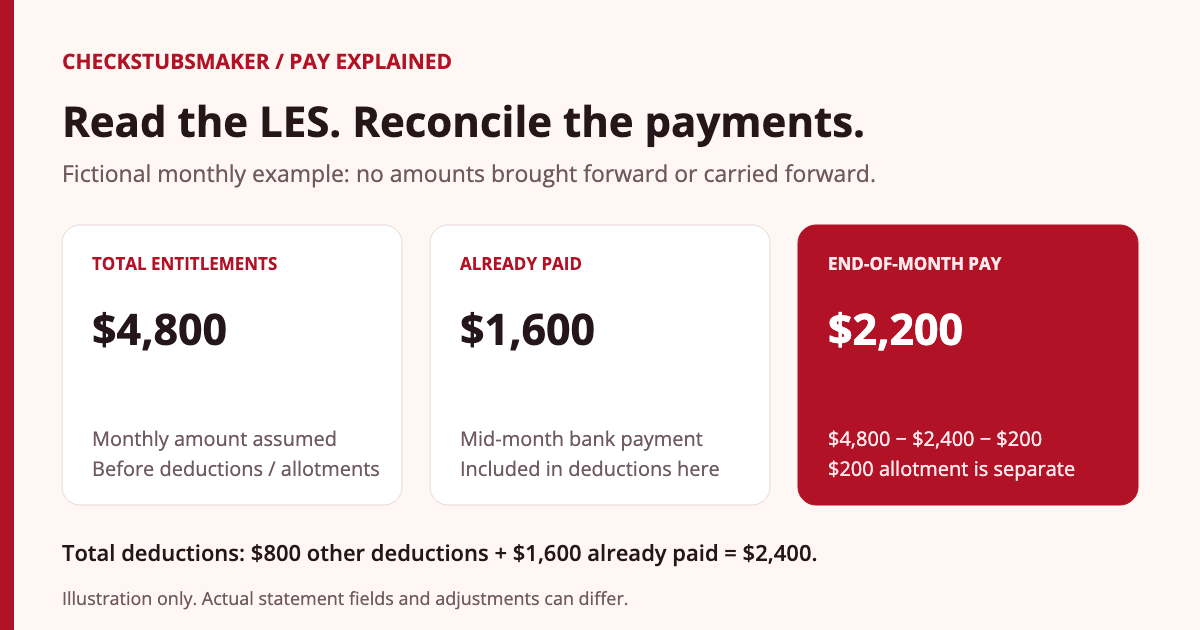
The full reconciliation is $4,800 − $800 − $200 = $3,800 distributed to the primary account over the two payments. Subtracting the $1,600 again after using total deductions would count the same prior payment twice.
Why does mid-month pay appear as a deduction?
The Army-hosted LES guide updated in May 2026 identifies mid-month pay among deduction entries. It also distinguishes entitlements, allotments, forwarded amounts, and the end-of-month payment.
A deduction-column entry can therefore account for money already delivered, rather than an additional tax or a fee. Confirm the actual payment in the bank record and ask finance to explain an unfamiliar code.
Use the correct dates and destinations when comparing records. Our bank-statement comparison explains why an account transaction and an earnings calculation answer different questions.
What else should you review?
Compare the current statement with the previous one. Identify changed entitlements, deduction amounts, allotment destinations, leave entries, and remarks. Match a change with its effective date and supporting order or election where applicable.
Keep leave units separate from dollars. Also distinguish a YTD total from current-period activity; our YTD guide explains that reading step.
Check the relevant branch guide when a field or acronym is unclear. Do not use a civilian payroll code definition to decide a military entry without confirmation.
How do you obtain older LES records or correct an error?
Use DFAS’s LES request instructions for the appropriate service and period when a record is unavailable online. Available history and request routes can differ; do not assume unlimited online access after separation.
For a calculation question, contact your servicing finance office or command administration. A focused request is: “Please reconcile the LES for [period], including the entry [label/amount], prior payments, allotments, and the end-of-month amount.”
Retain the original, supporting records, and any corrected statement. The general correction guide can help organize the issue, while the military pay office handles the actual record.
Frequently asked questions
Is an LES the same as a civilian pay stub?
It serves a comparable earnings-record purpose but contains military-specific fields and payment details.
Should total entitlements equal one bank deposit?
Not necessarily. Reconcile deductions, allotments, prior payments, and summary adjustments.
Is a mid-month deduction always a tax?
No. It may identify a payment already made. Confirm the entry and the corresponding transaction.
Does every branch and component use identical fields?
No. Use the guide and service that apply to your actual statement.
Can I download all past LES records from myPay?
Check the history available to your account and use the official service-specific request route for missing records.
Prepared by the CheckStubsMaker Editorial Team using official military pay sources and an original reconciliation example. See our editorial policy. The example does not determine pay entitlement, allowance eligibility, or tax treatment.