Gross-up pay is additional gross compensation calculated so an employee receives a specified net amount after the deductions included in the calculation. On a pay stub, the original award and gross-up may appear separately or as one gross earnings amount. Check the written net-payment promise, covered deductions, total earnings, and final payment. A gross-up does not automatically make the payment tax-free.
For U.S. employees and payroll teams · Sources checked November 16, 2026 · The examples use an invented flat 25% deduction assumption to explain the mathematics. It is not a federal tax rate, a real payroll estimate, or a substitute for applicable withholding calculations.
“A $600 bonus” and “$600 after specified deductions” are different promises. The first may describe gross earnings. The second may require payroll to calculate a larger gross amount. Ask which promise was made before comparing an award notice with the deposit.
What does grossing up a payment mean?
ADP’s gross-up explanation describes starting with a desired net payment and calculating the gross compensation needed to produce it. This reverses the usual gross-to-net reading of a paycheck.
A gross-up can be associated with a bonus or another payment covered by an employer’s arrangement. Do not assume every award, expense allowance, or separation payment includes one. Confirm whether the stated amount is gross, guaranteed net, or subject to a more limited tax-assistance policy.
Also confirm the scope of “net.” It might mean the payroll payment after specified taxes, rather than after every benefit deduction or any final income-tax liability calculated later. The actual agreement and payroll treatment need to explain the result.
What is the basic net-to-gross formula?
In a simplified model where every deduction is a constant fraction of the same gross amount, use:
Gross amount = target net amount ÷ (1 − assumed deduction rate).
This formula works because net equals gross multiplied by the portion remaining after deductions. If the assumed deduction rate is 25%, the employee retains 75% of gross in this model. Dividing the target by 0.75 finds the gross needed to leave that target.
The model is deliberately limited. Real payroll can use different wage bases, graduated withholding methods, wage caps, additional withholding, pre-tax benefits, and fixed-dollar deductions. A percentage observed on the last paycheck may not remain the correct percentage after gross pay changes.
Example: why adding 25% to $600 does not produce $600 net
Assume a fictional employer promises a $600 net award. For arithmetic only, assume a constant combined employee deduction of 25% of the entire gross award, no other deductions, and no reimbursement or noncash entry. The 25% is an invented input, not the IRS supplemental-wage withholding rate.
| Approach | Gross amount | Assumed deduction | Net result |
|---|---|---|---|
| Pay $600 gross | $600.00 | $600 × 25% = $150.00 | $450.00 |
| Add 25% of the target | $750.00 | $750 × 25% = $187.50 | $562.50 |
| Divide the target by 0.75 | $800.00 | $800 × 25% = $200.00 | $600.00 |
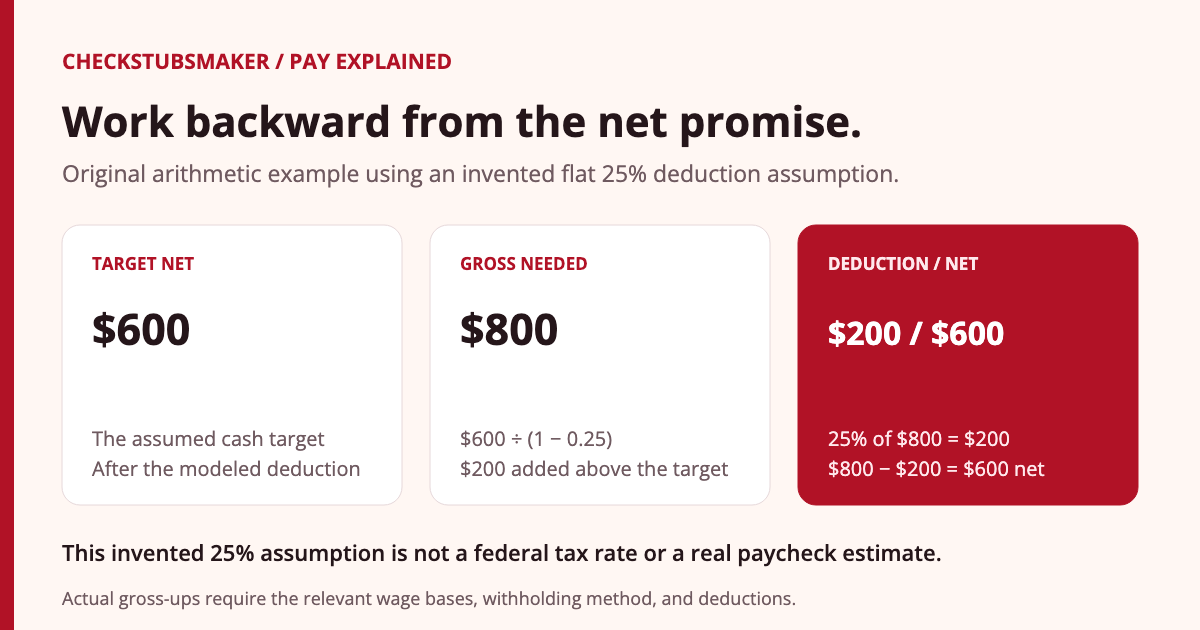
The successful calculation is $600 ÷ 0.75 = $800 gross. The extra gross compensation above the $600 target is $200. After the assumed $200 deduction, the employee receives $600.
By contrast, $600 × 25% is only $150. Adding that once produces $750 gross, but deductions on $750 are $187.50 in the same model. The resulting $562.50 net is $37.50 below the target.
These are original mathematical examples, not tax calculations for a particular person. For a separate discussion of actual bonus withholding conditions, see bonus pay on a pay stub.
What changes when fixed deductions or different tax bases apply?
If the same simplified arrangement also covers a fixed $30 after-tax deduction, the calculation changes. Under that new assumption, gross would be ($600 + $30) ÷ 0.75 = $840. The assumed percentage deduction is $210, leaving $840 − $210 − $30 = $600.
That extension applies only to the specifically assumed fixed after-tax item and constant percentage. A pre-tax contribution can affect a wage base as well as cash pay. A deduction limited by a balance, election, order, or wage threshold may behave differently again. See taxable wages and deduction codes.
The IRS Employer’s Tax Guide sets out the applicable wage-withholding rules. Payroll needs to use those rules and the employee’s actual inputs, rather than selecting the article’s invented percentage.
The employer’s own payroll taxes and benefits are another category. A gross compensation figure does not automatically equal the employer’s full cost. Keep company obligations separate from deductions used to calculate employee net pay.
How can the gross-up appear on a pay stub?
One payroll layout might display an award and an additional gross-up earnings row. Another might display the combined gross payment. Ask what each row represents and which amounts are already included in the total.
| Entry | What to verify | Double-counting risk |
|---|---|---|
| Award or original amount | Whether it is a gross component or a net target | Adding a target to a gross total that already covers it |
| Gross-up earnings | Which extra compensation the calculation added | Adding an informational amount twice |
| Employee deductions | Actual taxes and other included items | Treating employer costs as employee deductions |
| Net payment | Final cash and all payment destinations | Comparing only one split-account deposit |
Employer payment of an employee’s taxes can itself affect taxable wages. IRS Publication 15-A explains this for employer-paid employee Social Security and Medicare taxes and identifies special rules. Do not assume paying an employee’s tax outside the deposit automatically removes it from payroll reporting.
A noncash benefit can also produce payroll entries with no equal additional cash award. Identify that arrangement separately; our imputed-income guide explains the distinction. Do not apply the cash example to every benefit gross-up.
What should you ask if the net amount misses the promise?
- Locate the written award or payment agreement and identify the net or gross wording.
- Ask which taxes and other deductions the gross-up covers.
- Confirm the total gross earnings and the actual withholding calculation.
- Match the final net amount with all payment destinations.
- Request a documented payroll explanation or correction for an actual mismatch.
A focused request is: “Please reconcile the promised [amount] net payment with the gross earnings and gross-up on my [pay date] statement, identifying the deductions covered and the amount delivered.” See the correction guide for preserving the supporting records.
A payroll net-payment agreement does not, by itself, establish the final tax on a return. Keep the applicable annual wage statement and the employer’s explanation. Our gross versus net guide explains why gross wages, withholding, and cash received answer different questions.
Frequently asked questions
Does gross-up mean the award is tax-free?
No. It describes a net-to-gross calculation. Tax treatment follows the applicable rules for the underlying payment and any additional compensation.
Is 25% the federal gross-up rate?
No. This article invents a 25% combined deduction solely for a transparent arithmetic example.
Can I add the deduction percentage to the desired net amount?
That shortcut can fall short because the extra gross pay also enters the calculation. Check the stated assumptions and actual payroll method.
Will every employer show a separate gross-up row?
No. Some statements combine the earnings. Ask payroll which components the total includes.
Does the gross-up cover my final annual tax bill?
Do not infer that from the payroll label. Confirm the actual agreement and distinguish paycheck withholding from the annual tax calculation.
Prepared by the CheckStubsMaker Editorial Team using primary provider and IRS guidance with original hypothetical calculations. See our editorial policy. No actual withholding rate or personal tax outcome is estimated.